Oracle Database
The Oracle relational database management system (RDBMS) provides an open, comprehensive, integrated approach to information management

A database is a collection of data treated as a unit. The purpose of a database is to store and retrieve related information. The Oracle relational database management system (RDBMS) reliably manages a large amount of data in a multiuser environment so that many users can concurrently access the same data. This is accomplished while delivering high performance. At the same time, it prevents unauthorized access and provides efficient solutions for failure recovery.
Connecting to a Server
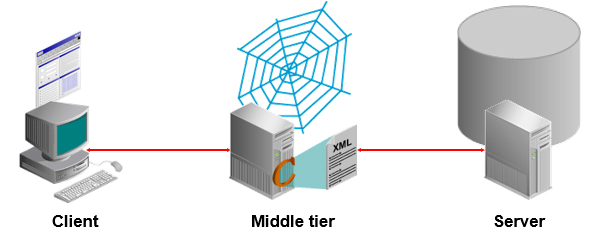
A database user can connect to an Oracle server in one of three ways:
. The user logs on to the operating system running the Oracle instance and starts an application or tool that accesses the database on that system. The communication pathway is established using the inter-process communication mechanisms available on the host operating system.
. The user starts the application or tool on a local computer and connects over a network to the computer running the Oracle database. In this configuration (called client/server), network software is used to communicate between the user and the back-end server.
- The client/server architecture database system has two parts: a front end (client) and a back end (server) connected through a network. Network software is used to communicate between the user and the Oracle server.
The client is a database application that initiates a request for an operation to be performed on the database server. It requests, processes, and presents data managed by the server. The client workstation can be optimized for its job. For example, the client might not need large disk capacity, or it might benefit from graphic capabilities. Often, the client runs on a different computer than the database server. Many clients can simultaneously run against one server.
Oracle Database Server Architecture: Overview
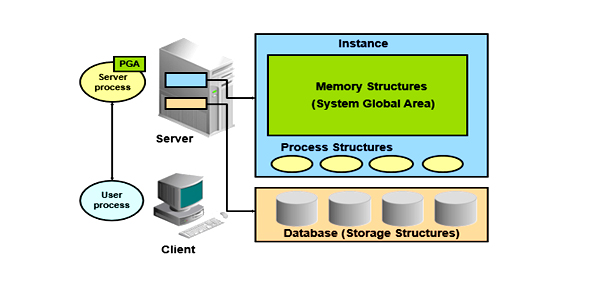
There are three major structures in Oracle Database server architecture: memory structures, process structures, and storage structures. A basic Oracle database system consists of an Oracle database and a database instance. The database consists of both physical structures and logical structures. Because the physical and logical structures are separate, the physical storage of data can be managed without affecting access to logical storage structures. The instance consists of memory structures and background processes associated with that instance. Every time an instance is started, a shared memory area called the System Global Area (SGA) is allocated and the background processes are started. Processes are jobs that work in the memory of computers. A process is defined as a “thread of control” or a mechanism in an operating system that can run a series of steps. After starting a database instance, the Oracle software associates the instance with a specific database. This is called mounting the database. The database is then ready to be opened, which makes it accessible to authorized users.
Note: The Oracle Automatic Storage Management (ASM) uses the concept of an instance for the memory and process components, but is not associated with a specific database.
The Oracle relational database management system (RDBMS) provides an open, comprehensive, integrated approach to information management
A database is a collection of data treated as a unit. The purpose of a database is to store and retrieve related information. The Oracle relational database management system (RDBMS) reliably manages a large amount of data in a multiuser environment so that many users can concurrently access the same data. This is accomplished while delivering high performance. At the same time, it prevents unauthorized access and provides efficient solutions for failure recovery.
Connecting to a Server
A database user can connect to an Oracle server in one of three ways:
. The user logs on to the operating system running the Oracle instance and starts an application or tool that accesses the database on that system. The communication pathway is established using the inter-process communication mechanisms available on the host operating system.
. The user starts the application or tool on a local computer and connects over a network to the computer running the Oracle database. In this configuration (called client/server), network software is used to communicate between the user and the back-end server.
- The client/server architecture database system has two parts: a front end (client) and a back end (server) connected through a network. Network software is used to communicate between the user and the Oracle server.
The client is a database application that initiates a request for an operation to be performed on the database server. It requests, processes, and presents data managed by the server. The client workstation can be optimized for its job. For example, the client might not need large disk capacity, or it might benefit from graphic capabilities. Often, the client runs on a different computer than the database server. Many clients can simultaneously run against one server.
Oracle Database Server Architecture: Overview
There are three major structures in Oracle Database server architecture: memory structures, process structures, and storage structures. A basic Oracle database system consists of an Oracle database and a database instance. The database consists of both physical structures and logical structures. Because the physical and logical structures are separate, the physical storage of data can be managed without affecting access to logical storage structures. The instance consists of memory structures and background processes associated with that instance. Every time an instance is started, a shared memory area called the System Global Area (SGA) is allocated and the background processes are started. Processes are jobs that work in the memory of computers. A process is defined as a “thread of control” or a mechanism in an operating system that can run a series of steps. After starting a database instance, the Oracle software associates the instance with a specific database. This is called mounting the database. The database is then ready to be opened, which makes it accessible to authorized users.
Note: The Oracle Automatic Storage Management (ASM) uses the concept of an instance for the memory and process components, but is not associated with a specific database.